
On this page
The Hollow rewards not showing: choose the right check
Choose a diagnostic branch
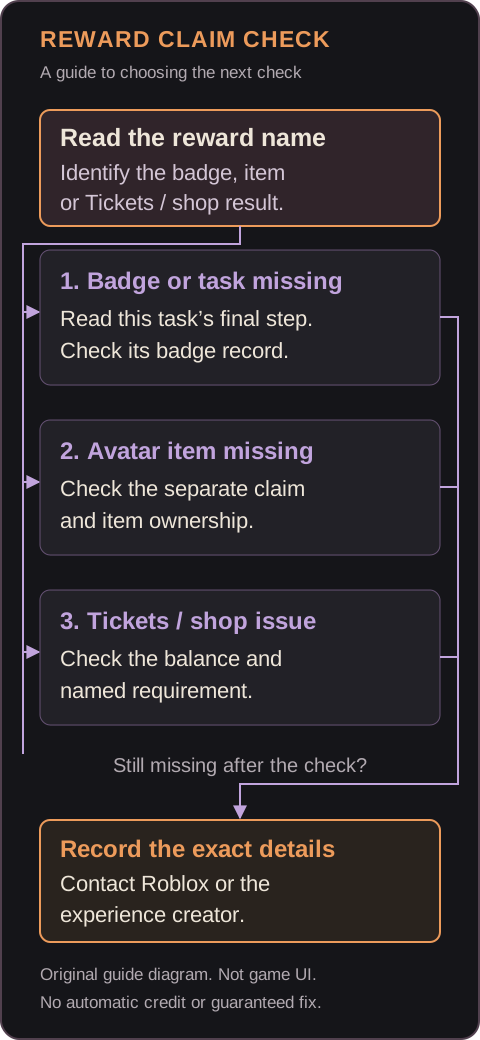
Start with the named result you expected. Task completion, badge credit, Ticket balance and avatar-item ownership are separate evidence; one does not automatically establish the others.
| Missing result | First check | Do not assume |
|---|---|---|
| Specific event badge | Current objective, final step and exact badge on the same account. | A solved puzzle or an older badge proves current event credit. |
| Avatar item, despite badge credit | That item’s conditions, any separate claim and its ownership page. | A matching badge name proves the item is free or already owned. |
| Tickets or shop access | Redemption result, actual balance and current item requirements. | Partner currency equals hub Tickets, or unknown cost means zero. |
Match the account and objective first
Account and objective matching
Keep this information together so that a result from another game, mode or year does not send you down the wrong branch.
- 01
Name the expected result
Record the badge, Tickets or item and its displayed requirement. If the result is unclear, read the claim display before replaying.
- 02
Match the current task
Check the account, experience, floor and objective. The hub’s Floor 2 relic maze and the activity inside Dandy’s World are different tasks.
- 03
Separate the records
Keep the completion cue, exact badge record and item ownership distinct. An older event badge or similar name is not a substitute for the current requirement.
If the event badge is missing
Relic-return walkthroughsSource ↗
Use this branch when the required badge is absent or its ownership is still unconfirmed.
- 01
Check the final action
For the first two reported hub relic routes, solving the puzzle is followed by relic pickup and a safe elevator return. Check the current objective for those steps. Partner experiences have their own requirements.
- 02
Check the exact badge
Match the badge named by the current task and its record on the account that played. A lit board, completion-looking animation or different year’s badge does not establish this credit.
- 03
Record the mismatch
If the final requirement is complete but credit is absent, retain the last step reached, badge name or public URL and visible message. There is no verified universal delay to wait out.
If the badge exists but the avatar item is missing
Inventory ownership checkSource ↗
A badge record and avatar-item ownership are separate checks.
- 01
Read the item’s conditions
Confirm the named item is associated with your completed task and check any separate claim interaction. The badge snapshot alone does not settle its price or eligibility.
- 02
Open the relevant Inventory category
On Roblox’s browser menu, choose Inventory, then the appropriate category and subcategory. Use the account that completed the task; no public-visibility change is needed to read this guide.
- 03
Open the item page
Look for Item Owned with a checkmark. Ownership and being equipped are different. If the item is not owned, retain its name and the claim message for support.
If Tickets or shop eligibility are the problem
Balance and eligibility checks
Use the live redemption and item displays. A Not confirmed catalog field is not zero cost, and buying Plus is not an established fix for missing credit.
- Balance did not change: record the task, redemption result and actual balance. Do not substitute a payout from an old guide or confuse partner-game currency with hub Tickets.
- Balance exists, item is locked: record the named card’s current price, conditions and exact error. Do not assume the missing condition is a subscription.
- Claim or purchase reports success, item is absent: preserve that message and use the avatar-item ownership check above.
Recheck once, then preserve the result
A limited recheck
After recording your evidence, try a normal rejoin through the official entry and check the same display and inventory again. This is a basic observation step, not a guaranteed repair. If nothing changes, keep the before-and-after result for support instead of repeatedly replaying or purchasing something without knowing which condition failed.
Two hypothetical cases
Hypothetical examples
Unfinished evidence: a player has a picture of a lit Floor 1 board, but no record of relic pickup or return. The picture supports puzzle progress, not completion of the reported full route. Check the final objective before treating this as a missing item.
Different reward records: a player confirms the current badge but cannot find a similarly named avatar item. Replaying does not establish entitlement. Check the item’s conditions, separate claim and ownership indication instead.
These are original illustrative examples, not game logs or real-player reports.
Use the right official support route
Bug-report destinationsSource ↗
For a problem isolated to a participating experience, use the support route stated on that creator’s official experience page. For a Roblox glitch, follow the official DevForum reporting guidelines; if you cannot post there, use Roblox Support and select Bug Report.
Explain what happens, when it started and whether it affects one experience or several. Similar forum reports do not prove your cause or that a fix reached your account. Use this site’s contact page for an error in our guide; account and item restoration belong with the appropriate official service.
What to include in a report
Minimum reproduction detailsSource ↗
A concise report should identify the missing result and make the failed step reproducible.
- Experience, floor or task, and exact reward type: badge, Tickets, shop claim or avatar item.
- Expected result, actual result and the last required action completed.
- Approximate completion date, time zone, device and app details.
- Exact error text and whether a normal rejoin changed the result.
- Public badge or item URL if known, plus redacted completion and error screenshots.
Sources and support boundaries
Editorial responsibility
This October 24 source review uses Roblox’s announcement, Inventory and bug-report help, and the hub badge snapshot. Gameplay directions remain media-reported; The Hollow Event Guide has not personally reproduced the runs.
No site login or account upload is needed. Send account identity only to official support when requested; never share passwords, verification codes, login cookies, payment or recovery details here. For a guide correction, a page URL, disputed step and public source or redacted evidence are enough.
Sources and verification
Official sources establish the facts attributed to them. Media walkthroughs are reported gameplay, and editorial checks explain how to compare evidence. None is a claim of playtesting by this site.
- Roblox · event announcement ↗
- Roblox Presents · The Hollow ↗
- Roblox API · hub badges ↗
- Roblox Support · Inventory ↗
- Roblox Support · bug reports ↗
- Beebom · reported event walkthroughs ↗
Found something different in the game? Send a correction with the page URL and evidence.